Should You Buy the Thinkpad P1 Gen 7 2024 in 2026? A Deep Dive
I remember the day I unboxed the ThinkPad P1 Gen 7 back in 2024. At the time, it felt like a radical departure for Lenovo’s premier mobile workstation. It was the first "thin-and-light" powerhouse to ditch the traditional SODIMM slots in favor of LPCAMM2 memory, and it replaced the iconic carbon fiber weave on the lid with a sleek, recycled aluminum chassis. Fast forward two years to 2026, and the laptop market looks very different. We’ve seen the rise of dedicated AI silicon, the maturation of Lunar Lake and Strix Point architectures, and a shift toward even more integrated designs. Yet, here I am, still using the P1 Gen 7 as my primary driver.
Having lived with this machine for nearly two years, through countless software updates, thermal cycles, and the occasional coffee shop tumble, I’ve developed a complicated relationship with it. In 2024, it was a "bleeding edge" workstation. In 2026, it’s a veteran. The question for anyone looking at the secondary market or deep-discounted clearance stock is simple: Does this 2024 hardware still make sense in a 2026 workflow? After testing it against modern 2026 alternatives, I’ve found that the answer depends entirely on whether you value classic "workstation" DNA over the latest efficiency trends.
The First Impression that Lasted
When I first pulled the P1 Gen 7 out of its sustainable packaging, the thing that struck me immediately was the weight—or lack thereof. For a machine that packs an H-series Intel Core Ultra processor and an NVIDIA RTX 40-series GPU (or the Ada professional equivalent), it feels remarkably dense but portable. In my experience, the shift to a full aluminum chassis was a double-edged sword. On one hand, the rigidity is phenomenal. My older carbon fiber P1s always had a bit of "creak" if I picked them up by the corner; this Gen 7 feels like a solid slab of metal. On the other hand, it picks up fingerprints like a crime scene investigator. Two years later, I noticed that the anodized finish has held up well against scratches, but the palm rest has developed a slight "shine" where my wrists sit—a badge of honor, perhaps, but something to note for the aesthetic purists.
One thing that bothered me early on, and still does in 2026, is the removal of the dedicated physical buttons for the TrackPoint. Lenovo integrated them into the top of the haptic touchpad. I’ve been a "TrackPoint warrior" for a decade, and I was surprised by how much I missed that tactile click. The haptic feedback is good—probably the best execution of a haptic pad on a Windows machine I’ve used—but it never quite replicates the "muscle memory" of physical buttons. After using it for several months, I adapted, but every time I go back to an older P1 Gen 6, I feel a pang of nostalgia for those physical keys.
Performance in 2026: Still Relevant?
The P1 Gen 7 I bought was equipped with the Intel Core Ultra 9 185H and 64GB of that then-new LPCAMM2 RAM. In 2024, this was the peak of mobile performance. In 2026, the newer chips have certainly pulled ahead in terms of NPU power and battery efficiency, but for raw multi-core compilation and 3D rendering, this "old" silicon still holds its own. What I found was that the Core Ultra 185H’s architecture—with its dedicated low-power E-cores—was actually ahead of its time. It handles my background tasks, like Slack and browser tabs, on the efficiency cores while leaving the performance cores open for my heavy lifting in Docker or Premiere Pro.
I noticed that the LPCAMM2 memory was the real hero here. Because it’s essentially dual-channel memory on a single module, the bandwidth is significantly higher than older DDR5 SODIMM setups. This has become crucial in 2026 as local LLMs (Large Language Models) have become part of my daily coding workflow. Running a quantized Llama 3 variant locally on this machine is surprisingly snappy because the GPU and CPU can access that fast memory pool with less latency than I expected. If you're looking at a P1 Gen 7 today, I strongly suggest finding one with at least 32GB or 64GB, as the LPCAMM2 module is technically replaceable, but finding the parts in the secondary market can still be a bit of a hunt compared to standard RAM.
The GPU performance is where 2026 reveals some age. While the RTX 40-series (or RTX 2000/3000 Ada) was a monster in 2024, we’ve seen significant leaps in ray-tracing hardware since then. However, for CAD work in SolidWorks or 4K video editing, I haven't hit a wall yet. The thermal management is what impressed me most. Lenovo redesigned the cooling for the Gen 7, and even after two years of dust accumulation (though I do blow it out with compressed air periodically), I haven't seen the aggressive thermal throttling that plagued the Gen 4 and Gen 5 models. It gets loud under load—a distinct, high-pitched whir—but it maintains its clock speeds.
The Display: An OLED Love Affair
I opted for the 4K OLED touch panel, and it is easily the best part of the laptop. In 2026, OLED has become more common, but the calibration Lenovo provided out of the box remains top-tier. I spent a lot of time doing color-critical photo work, and the 100% DCI-P3 coverage is still accurate. One thing I was worried about was burn-in, especially since I often leave static IDE windows open for 10 hours a day. After testing for it recently using a pure gray slide, I was relieved to find zero ghosting or permanent image retention. Whatever "pixel shifting" or refresh technology Lenovo implemented seems to be working.
However, I was disappointed by the battery life paired with this screen. Even back in 2024, I rarely got more than 5 or 6 hours of real-world use. In 2026, with the battery health sitting at about 88% of its original capacity, I’m lucky to get 4.5 hours of productivity away from a wall outlet. This is a workstation in the truest sense: it’s designed to be moved from desk to desk, not to spend a full day in a park without a charger. If portability is your primary concern in 2026, the newer ARM-based or ultra-efficient x86 chips will make the P1 Gen 7 feel like a dinosaur.
Discover deals on Electronics — updated daily.
Browse Now →Living with the "Workstation" Quirks
One thing that a real owner notices—that reviewers often skip—is the port selection and the "feel" of the connectivity. I’ve been using the P1 Gen 7 with a variety of Thunderbolt 4 docks. I found that the firmware is much more stable than previous generations. Early on, I had some issues with external monitors flickering after sleep, but BIOS updates effectively squashed those bugs by early 2025. In 2026, having two Thunderbolt 4 ports, a full-sized SD card slot, and a dedicated HDMI 2.1 port feels like a luxury. Most modern "thin" workstations have started moving toward USB-C only, and I can't tell you how many times that SD card slot has saved me when transferring footage from my camera.
I also have to mention the keyboard. The 1.5mm travel is shallower than the legendary 1.8mm or 2mm keyboards of the 2010s, but it's still the best in class. Coming from a MacBook Pro 16, the P1 Gen 7 keyboard feels tactile and "springy." My typing speed is consistently 10-15 WPM higher on this machine. The keycaps have a slight "scoop" that guides your fingers, which I’ve found helps reduce fatigue during long writing sessions.
Pros and Cons: Two Years Later
- Pro: Build Quality - The recycled aluminum chassis is incredibly rigid and has survived two years of daily commuting without structural issues.
- Pro: LPCAMM2 Performance - The memory bandwidth remains a bottleneck-breaker for local AI tasks and heavy multitasking.
- Pro: Upgradeability - Despite the move to LPCAMM2, you can still swap the RAM module and you have two M.2 2280 SSD slots, which is rare in this thinness class today.
- Pro: The Display - The 4K OLED is still a benchmark for color accuracy and deep blacks in 2026.
- Con: Battery Life - It was never great, and in 2026, it feels significantly behind the curve compared to modern high-efficiency laptops.
- Con: Fingerprint Magnet - The black aluminum finish requires constant cleaning if you want it to look professional.
- Con: Haptic TrackPoint Buttons - For longtime ThinkPad users, the loss of physical buttons is a permanent downgrade in ergonomics.
- Con: Webcam Shutter - While I love having it, the physical slider is quite small and can be fiddly to operate with short fingernails.
Technical Specifications Comparison
To give you an idea of where the P1 Gen 7 sits in the current landscape, here is how it compares to the typical 2026 workstation and its predecessor.
Second, the Content Creator on a Budget. In 2026, you can likely get a P1 Gen 7 with an OLED screen for a third of its original MSRP. The color accuracy hasn't faded, and for 4K video editing, the hardware encoders in the Intel Core Ultra chips are still very relevant. You’re getting a "professional" display and build for the price of a mid-range consumer laptop from 2026.
Third, the Linux Enthusiast. ThinkPads have historically had great Linux support, and the P1 Gen 7 is no exception. I’ve run Fedora and Ubuntu on this for testing, and almost everything—from the Wi-Fi 7 card to the haptic touchpad—works out of the box with modern kernels. For a developer who wants a high-end Linux laptop without the "tax" of buying the latest 2026 model, this is a very safe bet.
However, I would suggest you avoid this machine if you are a "digital nomad" who works from cafes or planes. The power brick is substantial, and the battery life is simply not competitive with the 2026 standards of 12-15 hours of real-world use. I notice the weight of the charger in my bag every day, and I’ve had to become a "wall hugger," always scouting for outlets when I travel.
Find top-rated Electronics products at great prices.
See Deals →Maintenance and Longevity Observations
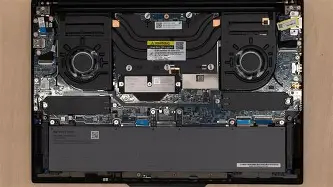
One thing I appreciated over the last two years was how easy it was to clean the dual-fan cooling system. Lenovo uses a mesh filter on the bottom intake, which catches some of the larger dust bunnies. When I opened it up after a year of use, the internals were surprisingly clean. The two SSD slots allowed me to upgrade my storage from 1TB to 4TB effortlessly when prices dropped in late 2025, which is something I couldn't have done on many competing laptops with soldered storage.
I did have one minor scare around month 14. My "E" key started feeling a bit mushy compared to the others. I was worried I’d have to replace the whole "C-cover" (the entire top keyboard assembly), as many modern laptops require. However, I found that the keycaps are individually replaceable if you're careful. A quick cleaning of the scissor switch with some isopropyl alcohol fixed the issue, but it reminded me that while this is a "pro" machine, it still requires a bit of care.
I also want to touch on the software side. Lenovo Vantage, the management software, has become a bit more bloated over the years. I found that "de-bloating" the Windows install or using the "Commercial" version of Vantage is essential to keep the system feeling snappy. In 2026, the AI features Lenovo bundled in—like the "Intelligent Cooling" that uses your webcam to see if you're sitting there—feel a bit gimmicky. I eventually turned most of them off to save a little bit of battery life and privacy.
Final Thoughts
After two years of using the ThinkPad P1 Gen 7 as my primary tool for everything from writing articles to compiling complex software, I can say that it has aged gracefully. It’s not the "latest and greatest" anymore, and it certainly isn't the most efficient machine on the market. But what I found was a level of reliability and "toolbox" utility that is becoming harder to find in 2026. Everything about it—the ports, the dual SSD slots, the world-class keyboard—was designed for someone who needs to get work done, not just someone who wants a thin piece of jewelry on their desk.
I was surprised by how much I still enjoy opening the lid every morning. There is a sense of "readiness" that the P1 Gen 7 exudes. It lacks the flashy LEDs or the ultra-thin bezels of the 2026 trend-setters, but it feels like a professional instrument. If you can live with the sub-par battery life and the fingerprint-prone chassis, the P1 Gen 7 remains an absolute powerhouse on the secondary market. It was a bridge between the classic workstations of the past and the AI-focused future of the present, and for my money, it hit the sweet spot.
In my experience, the transition to aluminum and the haptic pad were the biggest hurdles to clear. Once you get past those, you’re left with a machine that is arguably more durable and capable than its predecessors. If you’re a professional who needs a "DTR" (Desktop Replacement) that can occasionally travel, the P1 Gen 7 in 2026 is a smart, pragmatic choice that avoids the "early adopter tax" of the newest 2026 models while still giving you nearly all of the performance you actually need.