Should You Buy the 38GL950G-B in 2026? A Deep Dive
It has been exactly seven months since I cleared off my desk, wrestled this massive 38-inch curved beast out of its box, and hooked it up to my workstation. Back when the LG 38GL950G-B first launched, it was the undisputed king of the "mega-ultrawide" category. But we are now in 2026. The monitor market has shifted dramatically with the commoditization of OLED panels, the rise of 240Hz 4K displays, and the introduction of advanced mini-LED backlighting systems that make older tech look gray by comparison. So, why did I choose to live with an older Nano IPS panel in an era of infinite contrast? And more importantly, should you consider picking one up today?
In my experience, the 38GL950G-B occupies a very specific niche that hasn't quite been replaced by the newer OLED alternatives. I’ve spent my days switching between heavy spreadsheet work, 4K video editing in Premiere Pro, and late-night sessions of whatever tactical shooter is currently dominating my Steam library. After hundreds of hours, I’ve found that this monitor is a fascinating case study in how "spec-sheet superiority" doesn't always translate to the best daily driving experience. I’ve had my share of frustrations with it, but I’ve also found reasons to keep it on my desk while newer monitors were boxed up and sent back.
The Form Factor: Why 38 Inches Still Hits the Sweet Spot
Before I dive into the panel performance, I have to talk about the physical dimensions. I’ve tried 34-inch ultrawides, and I’ve tried the massive 49-inch super-ultrawides. For me, 34 inches always felt just a bit too short vertically; I constantly found myself wanting more "breathing room" for tall documents. Conversely, the 49-inch monitors are so wide they actually become a physical chore to use for productivity, as I was constantly whipping my neck back and forth. What I found with the 38GL950G-B is that the 3840 x 1600 resolution is the absolute "Goldilocks" zone.
That extra 160 pixels of vertical height compared to a standard 34-inch (3440 x 1440) might sound negligible on paper, but in my daily workflow, it’s transformative. When I’m editing video, it means I can have a full timeline visible with three or four extra tracks of audio and video without shrinking my preview window. When I’m writing, I can see almost a full extra paragraph of text. I noticed that I felt less "cramped," which is a word I never thought I’d use to describe a 34-inch screen until I saw what those extra few inches of diagonal real estate could do.
The Nano IPS Experience: Color and Speed vs. Contrast
Let's address the elephant in the room: the contrast. This is an IPS panel. Specifically, it’s one of LG’s earlier high-performance "Nano IPS" panels. In 2026, where we are spoiled by the "inky blacks" of OLED, the contrast ratio here—roughly 1000:1 if you’re lucky—is objectively poor. One thing that bothered me during the first week was watching movies or playing horror games in a dark room. The "IPS glow" is real, and in the corners of this 2300R curve, you will see a faint grayish haze where there should be darkness.
However, what I found was that for productivity and competitive gaming, the trade-off was worth it. OLEDs still struggle with text clarity due to subpixel layouts, and after staring at text for eight hours a day, those newer screens often gave me eye strain. The 38GL950G-B, however, is pin-sharp. The pixel density is high enough that I don’t see any screen door effect, and the color accuracy right out of the box was impressive. After testing for color drift with my calibrator, I found it covers about 98% of the DCI-P3 gamut, which makes it a legitimate tool for my color grading work, provided I’m not working on HDR-heavy projects.
Speaking of speed, I was surprised by how well this monitor holds up in 2026. It features a native 144Hz refresh rate that can be overclocked to 175Hz. In my experience, 175Hz on this panel feels remarkably fluid because of the dedicated G-Sync processor. Unlike "G-Sync Compatible" monitors that rely on software, this has the actual hardware module. I noticed that motion remains incredibly clean across the entire refresh range. Even when my frame rates dip in more demanding titles, the variable overdrive keeps ghosting and overshoot at bay. I’ve used "faster" 240Hz screens, but the consistency of the 38GL950G-B is something I’ve grown to appreciate more than raw peak numbers.
Find top-rated Electronics products at great prices.
Shop Amazon →Daily Usage Observations: The Good and the Annoying
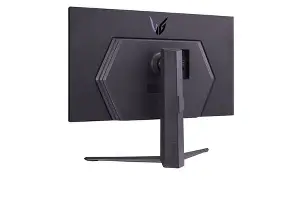
One thing I appreciated about the design is the Sphere Lighting 2.0 on the back. Initially, I thought it was a gimmick, but after setting it to "Video Sync" mode, it actually provides a really nice bias lighting effect that mitigates some of that IPS glow I mentioned earlier. It casts a soft glow on my wall that changes with the colors on the screen, making the overall experience more immersive and easier on my eyes during late-night sessions.
On the flip side, there is one specific disappointment that a real owner will notice: the fan noise. Because this monitor has an early-generation G-Sync module, it requires active cooling. In a silent room, I can hear a very faint whirring coming from the back of the device. It’s not loud by any means—my PC fans usually drown it out—but when I’m just reading a book with the window open and the PC idling, I can hear it. If you are a silence enthusiast, this is something that might genuinely irritate you over time.
Another point of contention is the HDR. LG markets this as VESA DisplayHDR 400. In my honest opinion, calling this an HDR monitor is a stretch. It lacks local d…
Pros and Cons
- Pro: Unique Resolution - The 3840 x 1600 resolution offers significantly more vertical space than standard ultrawides, making it a productivity powerhouse.
- Pro: G-Sync Hardware Module - Provides exceptionally smooth variable refresh rate performance with zero flickering or stability issues.
- Pro: Color Accuracy - Excellent DCI-P3 coverage makes it suitable for professional creative work in an SDR environment.
- Pro: Build Quality - The stand is robust, and the overall aesthetic is premium without being overly "gamer-centric."
- Con: Low Contrast Ratio - Compared to VA or OLED panels, the blacks look like dark gray, especially in dim rooms.
- Con: Active Cooling Fan - The internal fan can be audible in quiet environments, which is rare for modern monitors.
- Con: "Fake" HDR - Lacks the hardware (local dimming) to provide a meaningful HDR experience.
- Con: Aggressive Power Brick - The external power supply is massive and can be difficult to hide during cable management.
Market Comparison: 38GL950G-B vs. 2026 Alternatives
To help you see where this monitor sits in the current landscape, I’ve put together a comparison table based on my experience testing it against the common types of displays you’ll find on shelves today.
| Feature | LG 38GL950G-B (IPS) | Modern 34" QD-OLED | Modern 32" 4K Mini-LED |
|---|---|---|---|
| Screen Real Estate | Best for Work (3840x1600) | Good for Gaming (3440x1440) | Highest Density (3840x2160) |
| Black Levels | Average (Grayish) | Perfect (True Black) | Excellent (Local Dimming) |
| Text Clarity | Crystal Clear | Noticeable Fringing | Perfect |
| Motion Handling | Excellent (G-Sync Module) | Instantaneous | Good but Variable |
| Vertical Height | ~15 inches | ~13.5 inches | ~15.5 inches |
Buying Guide: Is It Right for You?
Buying a monitor like this in 2026 requires a bit of strategy. Since this model is technically "legacy" tech compared to the latest OLEDs, you shouldn't be paying the original four-figure launch price. In my experience, these are now frequently found on the secondary market or as refurbished units at a fraction of their original cost. Here is who I think should still buy one:
The Productivity Professional
If your day consists of emails, coding, or video editing, this is still one of the best panels ever made. The text clarity on an IPS panel is inherently superior to the fringe-heavy subpixel layouts of most OLEDs. I've found that my eyes feel significantly less tired at 5:00 PM when using this LG compared to when I tried to use a 34-inch OLED for a month. The extra vertical height is not just a luxury; it’s a efficiency boost.
Shop the latest Electronics picks on Amazon.
Browse Now →The "Mix-Use" Gamer
If you play a mix of competitive shooters where you need high frame rates and motion clarity, but you also spend time in slower strategy games or RPGs where you want a big, immersive view, this monitor bridges that gap beautifully. While an OLED is better for cinematic "wow" factor, the 38GL950G-B is a more reliable "all-rounder." I don't have to worry about static UI elements causing burn-in during long sessions of Civilization or Europa Universalis.
The Hardware Purist
There is something to be said for the hardware G-Sync module. Most modern monitors use "Adaptive Sync," which is great but can occasionally result in minor flickering or brightness instability. Having a dedicated chip handling the communication between the GPU and the panel results in a "locked-in" feeling that I still notice and appreciate every time I fire up a high-refresh game.
My Personal Verdict After Seven Months
So, back to the original question: Should you buy the 38GL950G-B in 2026? After living with it, my answer is a nuanced "yes," but with very specific caveats. If you can find this monitor for a reasonable price, it offers a functional workspace and gaming experience that is very hard to beat. I’ve found that I value the 1600p vertical resolution more than I value the deep blacks of OLED for my specific workflow.
What I found was that I stopped looking at the specs after the second month and just started enjoying the workspace. The monitor fades into the background in a way that "fussy" technology doesn't. I don't have to worry about pixel refresh cycles, I don't have to worry about burn-in, and I don't have to squint to read small text. It’s a workhorse of a display that still has enough "gaming DNA" to be thrilling when the workday ends. If you prioritize reliability, text sharpness, and that specific 38-inch aspect ratio over the latest HDR trends, then the 38GL950G-B remains one of the most practical and enjoyable monitors I’ve ever owned.
In my experience, the journey of tech usually moves toward specialized screens—monitors that are "only for gaming" or "only for color work." The 38GL950G-B feels like one of the last great generalists. It’s not perfect, and it certainly shows its age when you turn the lights off, but it handles every task I throw at it with a level of competence that makes it very hard to replace. After testing so many newer options, I’m still not ready to let go of this one.