Don't Buy the Alienware Aw2724Dm Until You Read This Full Analysis
The Alienware Aw2724Dm entered the market promising a compelling balance between high refresh rates, bright HDR, and the distinctive Alienware design aesthetic. For many shoppers the headline numbers — 27 inches, QHD (2560×1440), 165Hz native (overclockable to 180Hz), VESA DisplayHDR600, and G-SYNC/FreeSync support — look like a near-perfect gaming monitor. This analysis digs beneath the marketing copy to help buyers understand where the AW2724DM excels, where it compromises, and which real-world use cases it actually fits.
At a glance: what the Aw2724Dm is selling
In plain terms, the AW2724DM is a 27" IPS gaming monitor tuned for fast-paced play. Its key strengths are responsiveness and color vibrancy; its weaknesses are those typical of IPS-based gaming displays — contrast and, occasionally, panel-variation quality control. Buyers who value sharp, smooth motion and bright HDR highlights will find much to like. Those who need deep blacks for movie viewing or professional-level HDR for grading should read carefully before deciding.
Detailed product review and analysis
Design and ergonomics
The monitor presents the typical Alienware visual language: a solid metal-and-plastic stand, three-sided slim bezels, and AlienFX lighting accents on the rear. The stand offers height, tilt, swivel, and pivot adjustments; VESA 100×100 mounting is supported for third-party arms. For desk setups, the stand footprint is reasonable but not minimal — buyers with compact desks should measure before ordering.
Panel, color and image quality
Under the hood is an IPS panel with wide viewing angles and a wide color gamut (approximately 95% DCI-P3, 100% sRGB coverage, 10-bit color with FRC). Out of the box the monitor tends to deliver punchy colors and pleasing saturation, which is great for gaming, streaming, and general multimedia. Factory calibration is typically decent for a gaming display, but photographers and designers who require strict color accuracy will want to calibrate with a colorimeter.
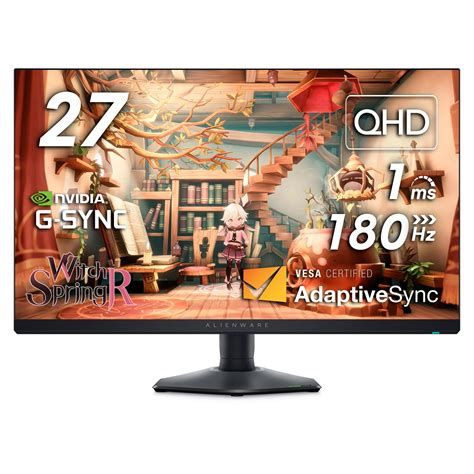
Because it is an IPS-type panel, expect the familiar IPS characteristics: very good viewing angles and color consistency, but limited native contrast compared with VA panels. In dim rooms the panel will show IPS glow — a faint lightening of dark areas near the corners when viewed off-axis — and blacks will appear grayish rather than deeply inky.
Brightness, HDR and local dimming
The AW2724DM is VESA DisplayHDR600 certified with peak luminance numbers that make HDR highlights pop compared with standard SDR displays. In practice, HDR performance delivers brighter specular highlights and richer colors in HDR-enabled games and movies. However, this is an edge-lit monitor without full-array local dimming (FALD). That means HDR contrast is improved but not the same as monitors with many dimming zones — some blooming or haloing around bright objects on dark backgrounds can be visible. For buyers who expect cinema-like HDR performance, this monitor will disappoint relative to high-end FALD or OLED alternatives.
Refresh rate, response time and competitive gaming
This is the AW2724DM’s forte. With a native 165Hz refresh rate and an overclock option to 180Hz (with DisplayPort), the monitor delivers very smooth motion. Alienware advertises a 1ms gray-to-gray response time in its fastest overdrive modes, and real-world testing by reviewers shows it to be very responsive with low perceived motion blur and low input lag — advantages for both competitive esports players and anyone sensitive to latency.
Adaptive sync support includes AMD FreeSync Premium Pro and certification for NVIDIA G-SYNC Compatible operation. This makes the monitor flexible across modern GPUs and consoles (via HDMI 2.1) — an important consideration for mixed PC/console households.
Discover deals on Electronics — updated daily.
Shop Amazon →Connectivity and extras
Typical connectivity includes DisplayPort 1.4 inputs, an HDMI 2.1 port, and a small USB hub for peripherals (USB 3.x downstream ports and an upstream port). Notably, the monitor does not include integrated speakers or a 3.5mm audio jack; many buyers will need external speakers or a headset. AlienFX RGB lighting and on-screen display (OSD) controls are useful but not differentiating features for most buyers.
Real-world performance notes
- Fast-paced shooters and competitive titles: The AW2724DM shines — high refresh and low lag improve aim precision and perceived smoothness.
- Single-player visually rich games: Colors and HDR look attractive, though shadow depth is limited by IPS contrast.
- Content creation: Colors are generally strong, but professionals should calibrate externally; HDR content creators will find limitations compared with true HDR mastering displays.
- Office/productivity: QHD on 27" is a good balance of screen real estate and readability; text clarity is acceptable though some users report mild color fringing in fine text at native resolution.
Common issues and quality control
Several community reports indicate a typical "panel lottery" — some units ship with perfect panels, others may exhibit stuck pixels, uneven backlight, or flicker at certain refresh-rate/HDMI/DP combinations. Firmware updates and power/reset cycles sometimes fix minor issues, but buyers concerned about out-of-box defects should review seller return policies and manufacturer warranty terms.
Pros & Cons
- Pros
- Very fast response and low input lag for competitive gaming
- High refresh rate (native …
Buying guide: is the Aw2724Dm the right monitor for you?
1. Match the monitor to the primary use case
- Competitive esports and fast FPS titles: If speed and low latency are the main priorities, the AW2724DM is an excellent choice thanks to its high refresh and responsiveness.
- Mixed gaming and media consumption: The monitor is strong for colorful, bright content but not ideal if deep blacks and film-like HDR are essential.
- Professional color work: Photographers, videographers, and designers should seek out monitors with factory-calibrated color, higher color accuracy reports, or invest in external calibration — or consider a dedicated professional display with wider gamut and better HDR control.2. Consider the GPU and performance expectations
A 27" QHD monitor at 165–180Hz requires a capable GPU to make full use of the refresh rate in modern AAA titles. Buyers with mid-range GPUs may find themselves GPU-bound at native QHD; consider whether frame-rate targets (120–180 FPS) are realistic with the rest of the system. Adaptive sync helps smooth variable frame rates, but raw frames per second still depend on compute power.
3. Evaluate HDR expectations
HDR600 improves highlight brightness, but because the monitor is edge-lit, avoid expecting FALD-level contrast or the deep, zone-controlled HDR look seen on more expensive HDR monitors. If true HDR fidelity is a priority, compare models that advertize full-array local dimming or explore OLED alternatives (keeping in mind OLED’s own trade-offs like potential burn-in risk).
4. Check connectivity and future-proofing
HDMI 2.1 is useful for next-gen consoles and GPUs, and DisplayPort 1.4 allows the higher overclocked refresh rates. If you plan to switch between PC and console frequently, HDMI 2.1 compatibility is a well-considered asset. Consider cable quality and how many downstream USB ports are necessary for a tidy desk setup.
Discover deals on Electronics — updated daily.
View Offers →5. Understand warranty, returns, and the panel lottery
Because gaming monitors sometimes suffer from dead pixels or backlight issues, verify the seller’s return window and Dell’s warranty coverage. If the vendor offers an advanced replacement or generous return policy, that mitigates the risk of receiving a defective unit.
6. Ergonomics, desk space and mounting
Make sure the monitor stand fits the workspace and that VESA mounting is available if mounting to an arm is desired. The AW2724DM’s pivot, swivel, and height options suit multi-monitor setups and mixed portrait/landscape workflows.
7. Calibration and settings to try
For best results out of the box, check the monitor’s factory profile and run through the OSD modes: try the “Gamer” presets and then test custom color temperatures. For color-critical work, use a colorimeter and software (e.g., DisplayCAL) to produce a reliable profile. For competitive play, lower response-time settings and disable any motion smoothing that adds input lag.
Final verdict
The Alienware Aw2724Dm is a strong contender for gamers who prioritize high refresh rates, low latency, and vibrant colors. It is especially attractive to competitive players and mixed PC/console households thanks to its responsive panel and HDMI 2.1 compatibility. However, buyers should temper HDR expectations (edge-lit HDR600 is not the same as zone-dimmed HDR) and be mindful of potential quality-control variability between units.
For those who need the deepest blacks and cinema-grade HDR, a VA panel with strong local dimming or a higher-end FALD/OLED display will be more appropriate. For professionals chasing reference-grade color or HDR mastering, a dedicated professional monitor remains the right tool. For most gamers and general users who want a fast, colorful, and ergonomically flexible 27" QHD display, the AW2724DM is a compelling option — provided buyers check return policies and plan to calibrate if color-critical work is intended.
Ultimately, the decision should come down to honest expectations: if the priorities are raw speed, bright colors, and a premium gaming look-and-feel, the AW2724DM is worth strong consideration; if the priorities are cinema-like HDR, perfect blacks, or absolute out-of-box professional color accuracy, examine alternatives first.