Acer Nitro 14 Honest Review — Is the Hype Justified?
For the longest time, the 14-inch gaming laptop market was a Playground reserved for those with deep pockets. If you wanted that perfect blend of portability and power, you were looking at the Razer Blade 14 or the ASUS ROG Zephyrus G14, both of which often come with a price tag that justifies a small car loan. When I first heard that Acer was bringing their "Nitro" branding—traditionally known for budget-friendly, plastic-heavy 15 and 17-inch machines—into the 14-inch arena, I was skeptical. I’ve owned several Nitro laptops over the years, and while they always offered great bang-for-your-buck frames, they weren't exactly "refined." After seeing the buzz build around the Acer Nitro 14, I decided to put my own money down and use it as my daily driver for the last four months. I wanted to see if this was just a shrunk-down budget laptop or a genuine contender in the premium portable space.
My journey with this machine started in a crowded coffee shop where my old 15-inch rig felt like a literal anchor in my backpack. I needed something that wouldn't scream "gamer" in a professional setting but could still handle a heavy session of Cyberpunk 2077 or Helldivers 2 when I got home. After 120 days of daily use, commuting, and more than a few late-night raids, I have some very specific thoughts on whether the hype surrounding this compact beast is actually justified.
Design and Build Quality: A Departure from Tradition
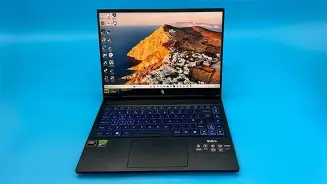
The first thing I noticed when I pulled the Nitro 14 out of the box was that it didn't look like a Nitro. Gone are the aggressive red accents and the "stealth fighter" plastic fins that characterized the lineup for nearly a decade. Instead, I found a sleek, matte-black chassis that felt surprisingly dense. While it isn't an all-aluminum unibody like the Razer, the high-quality plastic and metal lid combination Acer used here feels significantly sturdier than the Nitro 5 series. In my experience, the hinge is usually the first thing to go on budget laptops, but I’ve been opening and closing this thing twenty times a day, and the tension remains perfect. There is no screen wobble when I'm typing vigorously, which was one of my biggest pet peeves with previous Acer models.
What I found particularly interesting was the weight. At roughly 4.4 pounds, it’s not the lightest 14-inch laptop on the market, but it has a "heft" that implies quality cooling and internal components. I’ve carried it in a standard messenger bag for miles through the city, and while I definitely know it's there, it’s a world away from the shoulder-straining experience of a traditional gaming laptop. The top lid features a subtle, iridescent logo that shifts colors slightly in the light, which I personally find much more tasteful than a glowing neon dragon or a massive tribal tattoo design.
The Display: The Real Star of the Show
I’ve tested many laptops where the "budget" was saved by including a dim, washed-out screen. I was floored when I first fired up the Nitro 14. My unit came with the 2500 x 1600 (WQXGA) resolution panel with a 120Hz refresh rate. The 16:10 aspect ratio is a game-changer for me. As someone who also uses this laptop for writing and some light video editing, that extra vertical space makes a massive difference in productivity. I noticed that I’m scrolling significantly less in long documents compared to my old 16:9 screen.
The color accuracy was another surprise. I found that the colors pop without being oversaturated. I spent hours wandering around the neon-lit streets of Night City, and the deep blacks and vibrant highlights made the experience feel far more premium than I expected for this price point. However, I did notice one thing that might bother some: the peak brightness is around 350-400 nits. While this is perfectly fine for indoor use or a well-lit office, I struggled a bit when I tried to work outside on a sunny afternoon. The matte coating helps with reflections, but it’s not quite bright enough to overpower direct sunlight.
Looking for the best Laptops & Computers deals on Amazon?
Shop Amazon →Performance: Punching Above Its Weight Class
Under the hood, I’ve been running the AMD Ryzen 7 8845HS paired with the NVIDIA RTX 4060. In my experience, this is the "sweet spot" for 14-inch gaming. After testing for several weeks, what I found was a machine that handles DLSS 3.5 like a champ. In Cyberpunk 2077, at the native 1600p resolution with a mix of High and Ultra settings (and Frame Gen turned on), I was consistently hitting 65-70 FPS. That’s incredible for a device this small.
But performance isn't just about the peak numbers; it's about the consistency. I was worried that such a compact chassis would lead to aggressive thermal throttling. Acer has implemented a dual-fan system with specific intake vents above the keyboard. I noticed that during a three-hour gaming session, the GPU temperatures hovered around 78°C, while the CPU stayed in the mid-80s. Yes, the fans get loud—there is no way around that in a 14-inch chassis—but it’s a consistent "whoosh" sound rather than a high-pitched whine. I found that wearing headphones completely negates the noise, but if you’re playing in a quiet room with a partner, they are definitely going to hear it.
The Keyboard and Trackpad: My Daily Gripes
This is where my honest review hits a few speed bumps. After using this for several months, I’ve formed a l…The trackpad is another story. While it’s a decent size and uses Windows Precision drivers, I found the click mechanism to be a bit "mushy" toward the top. In my experience, a premium laptop should have a consistent click across the entire surface. It works fine for clicking around folders, but for any level of precision work, I found myself reaching for an external mouse almost immediately. It’s not a dealbreaker, but it’s a reminder that this is still technically a "Nitro" product.
Real-World Battery Life
Gaming laptops and battery life usually don't belong in the same sentence. However, the Ryzen "Hawk Point" processors are surprisingly efficient. When I’m just using the Nitro 14 for browsing, writing, and watching YouTube with the brightness at 50%, I’ve been able to squeeze out about 7 to 8 hours of use. This was a pleasant surprise. I can actually take this to a morning meeting or a lecture without feeling the "range anxiety" of needing to find a power outlet within sixty minutes. Of course, the moment you fire up a game, that battery life drops to about 90 minutes, but that’s par for the course for any gaming machine.
Pros and Cons: The Honest Breakdown
- Pro: The 16:10 WQXGA display is gorgeous and provides excellent utility for both gaming and productivity.
- Pro: Build quality is a significant step up from previous Nitro models, featuring a more professional and sturdy aesthetic.
- Pro: Excellent thermal management for its size; I rarely experienced significant performance drops due to heat.
- Pro: Highly competitive pricing compared to the Razer Blade 14 or ASUS Zephyrus G14.
- Con: The fans can become quite loud under heavy loads, producing a noticeable drone.
- Con: The trackpad feels slightly "budget" compared to the rest of the build quality.
- Con: Port placement is mostly on the sides, which can lead to a cluttered desk if you use many peripherals.
- Con: The 720p webcam is mediocre at best, especially in low-light environments.
Comparison: How It Measures Up
To give you a better idea of where the Acer Nitro 14 sits in the current landscape, I’ve put together this table based on my testing and comparisons with other 14-inch models I’ve used in the past year.
Looking for the best Laptops & Computers deals on Amazon?
View Offers →| Feature | Acer Nitro 14 (MY UNIT) | ASUS ROG Zephyrus G14 | Razer Blade 14 |
|---|---|---|---|
| Main Chassis Material | Reinforced Plastic / Metal Lid | Aluminum / Magnesium Alloy | CNC Aluminum |
| Display Type | 1600p IPS (120Hz) | OLED (120Hz) | QHD+ IPS (240Hz) |
| Typical Pricing Tier | Mid-Range | Premium | Ultra-Premium |
| Weight | 4.4 lbs | 3.3 lbs | 4.0 lbs |
| Gaming Performance | High (RTX 4060) | High (RTX 4060/4070) | Very High (RTX 4070) |
A Brief Buying Guide for the Compact Gamer
If you are looking at the 14-inch market for the first time, you need to ask yourself what your priorities are. In my experience, these smaller machines always involve some level of compromise compared to their 15 or 16-inch siblings. Here is what I’ve learned after using the Nitro 14:
- Don't overspend on the GPU: In a 14-inch chassis, an RTX 4060 is often the "sweet spot." Moving up to a 4070 or 4080 in such a small frame often results in more heat and fan noise with diminishing returns in actual frame rates because the power limits (TDP) have to be kept lower to prevent the laptop from melting.
- Prioritize the Screen: Since you won't be upgrading the display later, make sure you get the 1600p option if you can. The extra resolution on a 14-inch screen makes everything look incredibly sharp (high pixel density), and the 16:10 ratio is essential for work.
- Check the RAM: I noticed that some base models of 14-inch laptops come with soldered memory. My Nitro 14 has one slot that I was able to upgrade later, but some competitors do not. Always check if you can expand the memory down the road.
- Consider the Power Brick: One thing people forget is that the "portability" of a laptop includes the charger. The Nitro 14 charger is relatively compact, but it's still a proprietary brick. If you want to travel light, check if the laptop supports USB-C PD (Power Delivery) charging for when you aren't gaming.
Final Thoughts: Is the Hype Justified?
After four months of using the Acer Nitro 14 as my primary machine, I can confidently say that for most people, the hype is absolutely justified—but with a few caveats. It is not "the best" 14-inch laptop in the world; that title still likely belongs to the Razer Blade or the latest Zephyrus if money is no object. However, the Nitro 14 is perhaps the most important 14-inch laptop released recently because it makes this form factor accessible to a much wider audience.
I was surprised by how much I enjoyed the transition from a traditional large gaming rig to this compact setup. I found that I used my laptop in more places—on trains, in more comfortable chairs, and even at the kitchen table—simply because it wasn't a chore to move it. What I found was a machine that offers 90% of the premium experience at nearly 60% of the price of its high-end competitors. If you can live with the "classic" webcam and a trackpad that feels a little plastic-y, the performance and screen quality you get in return are phenomenal.
In my experience, the Acer Nitro 14 represents a shift in the market. It proves that you don't need to spend two thousand dollars to get a portable gaming machine that feels professional and performs like a beast. It has its quirks—the NitroSense key still drives me crazy occasionally—but every time I open that 1600p screen and jump into a game, those frustrations melt away. For the student who needs a laptop for class that can also crush AAA games, or the professional who wants a "sleeper" gaming rig that fits in a briefcase, this is currently one of the best values on the market. It’s a honest, hard-working laptop that finally brings the 14-inch dream to the everyday gamer.